Android Programming

Today, everything came together, just the way I wanted it to!

I took the day off work so we could leave early for camping this weekend, but Dave found a temporary job and had to work today, and we really didn’t have the money to spend on a trip, so we cancelled the camping trip – but I didn’t cancel MY vacation day! Instead I got up early, intent on working towards my latest goal – learning to write android apps.

I have been wanting to do this for some time, but at first we didn’t have ANY Android devices. At Christmas time we got Dave a nice Android phone, which actually saved us money because he can use it to charge credit cards for the toy business using Square, and was able to close our Merchant Account with the bank (which cost us money if we used it or not!) At the same time I got my Kindle Fire, which has made life so much more bearable with the long bus rides to work, plus I use it all day to listen to podcasts while I’m working, and drown out the noise of the people in the cubicles around me. So we actually have two Android devices I can work with now.

My first thought this morning was, it would be really handy to have a second monitor – one to program on, and one to have documentation open on and look stuff up. I’m spoiled by having two monitors at work! I told Dave it sure would be nice to add a small flatscreen to my system, and he said ‘why don’t you use the extra monitor?’ – EXTRA MONITOR?!! I had completely forgotten we had an extra left over from when we closed the store! I whipped up a way to mount it on my desk next to my laptop, plugged it in, and it worked like a charm! The laptop was made to have a second monitor – no problem!
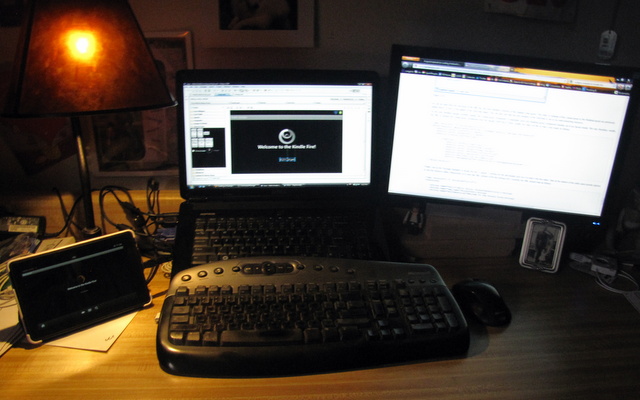
I couldn’t have had it work any better! So while Dave was away working, I was playing with my Kindle. Here it is, my laptop and the bigger second monitor, and on the left, my Kindle, hooked up to the laptop and running a program I WROTE! What a kick in the pants! 🙂 I used to love programming, but there’s nothing like doing something for a living to take all the joy out of it. I could see this being fun again!

_

Downtime caused by New Laptop!

I’ve been recovering from a big computer changeover. A friend heard about my sad old laptop and GAVE me a new one! Unbelievable! I’ve never had anyone do anything so kind and generous out of the blue like that. I am so grateful to him! But of course it takes a while to get everything moved over, learn to navigate Vista, and get all my accessories (like my wireless keyboard) working again – all things that turned productivity way down. But today I’ve finally got it all back together. I ca get pics off my camera again, and the keyboard/mouse is working (hard to get any serious work done on the laptop keyboard and touchpad). I LOVE my new laptop, a Dell 1545. It is fast and the screen is HUGE and it’s been pretty easy to work with so far. I don’t even have any complaints about Vista (it was free, who am I to complain?)

After copying all my data off the harddrive, the old laptop retired to the store, where it is getting used everyday. Nice to not have to drag a computer between home and work anymore.

Hot Rod Laptop

My six year old Dell Inspiron 1100 laptop has been a faithful friend. Oh, we’ve had our ups and downs, but for the most part it has been a workhorse. A couple years ago I upgraded to a bigger/faster harddrive and maxed out the internal memory. For the past year it has gotten dragged to work everyday, and back home at night.

Last Christmas the monitor went out, and I was lucky to find one on eBay which was mis-labelled as the smaller monitor, when I could tell from the picture it was the larger one. So I got it for a steal and replaced my broken monitor. Then this year the power adapter went bad and we found replacements for $6. Then the battery gave up and it turns out the laptop won’t work without a somewhat functioning battery, even if it’s plugged in. So we replaced that, and it kept plugging along.

A couple weeks ago the fan gave a sad little squeel and quit. Without the fan the laptop could only run for a couple minutes at a time without overheating. Once again to eBay, where I found a new fan and heatsink combo. While waiting for it to arrive I pulled the laptop apart.

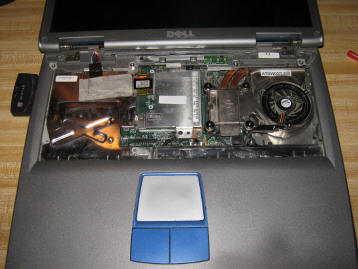
There’s a view I’ve seen all too often. The fan is on the right, and the CPU is under it, just to the left.

Pulling out the fan/heatsink as a unit, I realized the chip was cemented onto it from the years of cooking that cooling gel between them. This is actually an opportunity in disguise. Instead of trying to pry the chip off the old heatsink, or pullling just the fan out of the new one, why not buy a new CPU? The old one is a Celeron 2.3GHz. It only has a 128k cache I think.
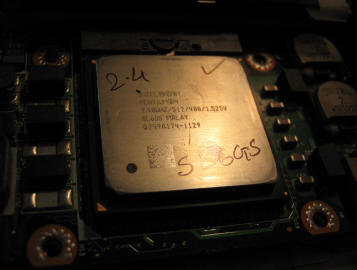
I did a bit of research, went on the Dell forum to double check my understanding, and went on eBay again, this time looking for a Pentium 4 CPU, with a 400MHz bus and 512k cache. I had my choice of CPU speeds, since the laptop requires the more plentiful desktop CPU, not a laptop CPU, so there were many to choose from. I went with a 2.4GHz, hoping that would not increase the laptop’s cooling issues. Then I sat back and waited for my parts to arrive.

Drops right in.

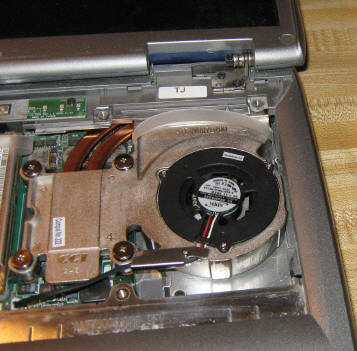
New heat sink and fan go in on top of it (with cooling gel between). I reassembled and held my breath as I pushed the power button. It made a noise like someone had stepped on a small animal. Uh-oh! I tried a couple more times, then followed the power cable back to the wallplug and discovered I had unplugged it! Duh! That sad little noise was the dead battery. Ok, plug it in, turn it on, and it came right up like nothing had changed. Ran a few programs, and it seems nice and quick. But the real change is online. Suddenly it can handle watching videos online, and even streaming video on Hulu – what a bonus for those long boring days at the store!

Yay – long live the Inspiron!

When I bought this laptop I was thinking it was going to be a sort of throwaway computer. My last couple desktops had grown obsolete so quickly, and I knew that laptops were even less upgradable than desktops. So when we bought it we bought the cheapest one available. It has been a great little computer, and thanks to the pages of information on the internet, as well as the easy accessability of parts on eBay, it is going to continue to be a workhorse for a little while longer. I can’t complain about the six years of use I’ve gotten out of it so far.